Author Archives: tracker

Xbox One Unboxing: Day One

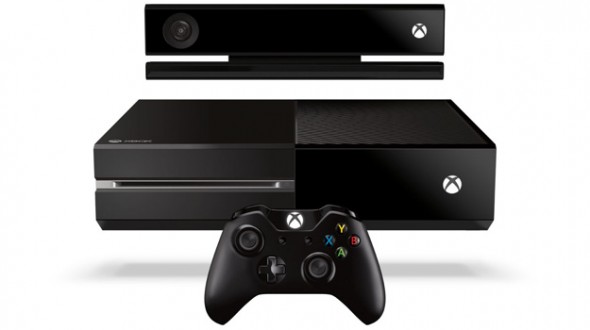
We are days away from the the Xbox One launch but videos are appearing on the web showing what is inside the Xbox One box with unboxing videos. Check out this Xbox One Unboxing video below to find out what you can expect when you use our Xbox One Tracker to find yourself a new Xbox One!

Credit to Major Nelson for this video back on August 8, 2013.

Deal of the Day: Apple Time Capsule 3TB for $230, 2TB for $170

MacMall has a deal on the Apple Time Capsule units: 3TB for $230, 2TB for $170. There are the Apple equivalent of a NAS that offers automated backup to the hard drive built inside a wireless router. These are a generation old but with plenty of storage and speed.

Apple 2TB Time Capsule

Apple 3TB Time Capsule


apple time capsule

Apple iPhone 5S Inventory Locator & Tracker

Production yields for the iPhone 5S are known to be low but thanks to our iPhone 5S locator, we hope to help you track down your new phone. We will continue to update this list after September 20th:

iPhone 5S 16GB
Amazon
Apple
AT&T
Best Buy
Sprint
T-Mobile
Verizon

iPhone 5S 32GB
Amazon
Apple
AT&T
Best Buy
Sprint
T-Mobile
Verizon

iPhone 5S 64GB
Amazon
Apple
AT&T
Best Buy
Sprint
T-Mobile
Verizon

iphone 5s locator

Official: Xbox One Launch Titles includes…

Xbox One launch titles list officially got released from Microsoft today at the Gamescom press release. We are still waiting for the console release date but there are pre-orders still available from many online retailers. Did you pre-order your Xbox One yet? We have a post dedicated to preorders on our Xbox One inventory tracker post.

According to CBS News, here is the official list of Xbox One launch titles:

  • Assassin’s Creed IV: Black Flag
  • Battlefield 4
  • Call of Duty: Ghosts
  • Crimson Dragon
  • Dead Rising 3
  • FIFA 14
  • Fighter Within
  • Forza Motorsport 5
  • Just Dance 2014
  • Killer Instinct
  • LEGO Marvel Super Heroes
  • Lococycle
  • Madden NFL 25
  • NBA 2K14
  • NBA LIVE 14
  • Need for Speed: Rivals
  • Peggle 2
  • Powerstar Golf
  • Ryse: Son of Rome
  • Skylanders: Swap Force
  • Watch Dogs
  • Zoo Tycoon
  • Zumba Fitness: World Party

xbox one launch titles

PS4 Release Date is Official in North America and Europe…

Playstation 4 finally has a release date: November 15th in North America and 29th in Europe. This news came today after the Sony Gamescom press conference. Have you pre-ordered your PS4 yet? Since PS4 release date is approaching, you should order soon! Plenty of online retailers still have units available and we have a Playstation 4 pre-order tracker available.

According to Forbes, Sony is off to a head start with their PS4 release date and policies:

Sony definitely has the advantage in day one reach — the console will be coming out in 32 countries this holiday season, as opposed to Xbox One’s 13. Sony concluded its press conference with a little jab at its chief rivals dramatic about-face on many of the Xbox One’s more controversial policies.

ps4 release date

Xbox One Release Date is Approaching! Here is our countdown…

The Xbox One release date is quickly approaching! So far many retailers are still guaranteeing a day one release unit if you pre-order today. The latest Microsoft console is expected to ship by the end of November. Many retailers have pre-orders for day one edition systems with additional accessories. We have a separate post dedicated to which online retailers still have the Xbox One available for pre-order but some of the most populate destinations include Amazon and BestBuy.

Here is our release day count down:


xbox one release date

Xbox One 2.0: No internet required, less DRM!

Microsoft released a press release today that should make gamers happy: no more internet requirement and less DRM on the Xbox One than they initially announced! See the official update here or this quote below – Xbox One preorders are still available from various online retailers.

  • An internet connection will not be required to play offline Xbox One games – After a one-time system set-up with a new Xbox One, you can play any disc based game without ever connecting online again. There is no 24 hour connection requirement and you can take your Xbox One anywhere you want and play your games, just like on Xbox 360.
  • Trade-in, lend, resell, gift, and rent disc based games just like you do today – There will be no limitations to using and sharing games, it will work just as it does today on Xbox 360.Trade-in, lend, resell, gift, and rent disc based games just like you do today – There will be no limitations to using and sharing games, it will work just as it does today on Xbox 360.


How to rollback (downgrade) your iPhone from iOS 7 to iOS 6 – works on iPhone 4, iPhone 4S and iPhone 5!

Many users want to revert back to iOS 6 after installing iOS 7 while using the developer preview. So far, this process has been painless. Although this topic isn’t related to finding an Xbox One or Playstation 4, we thought it would be helpful for out tech loving readers to provide a few tips on how to rollback their iPhone OS. We are not responsible for any issues this guide might cause but it did work for us when we used the steps below to complete the rollback with the first version of iOS 7 (developer preview) installed on an iPhone 4S (these should also work on an iPhone 5 and iPhone 4:

  1. Start by downloading the latest version of iOS 6 for your device. You can do this by visiting the following site. Be sure to download the correct version for your phone and carrier. iPhone 5 devices will need to install 6.1.4 while other devices will need to use 6.1.3.
  2. Connect your iPhone to your computer that you used to install iOS 7 but this time when iTunes opens and it begins to sync, quickly cancel the process.
  3. Next, if your iPhone isn’t selected on the left hand side of iTunes, click on your device and then your device info should appear on the right side of the screen. Now on a Mac hold the Option key or on a Windows PC hold the shift key while clicking Restore.
  4. Now you should get a pop-up asking you to browser to your firmware. You will need to browse to the uncompressed version of iOS 6 that you downloaded in step 1.